
Neurodiagnostic team scheduling
Every shift covered by someone qualified to work it.
Axiom Shift is scheduling built for how a neurodiagnostic department actually staffs: qualification-restricted units, 24/7 monitoring beside a weekday lab, specialized procedures only certain techs can work, travelers on contracts, and students who are present but not coverage. It drafts the month, flags what a spreadsheet hides, and remembers who gave up their weekends.
Built by Drewe Cosby, R. EEG T., a registered EEG technologist and neurodiagnostic operations leader, for the departments he has actually staffed.
The demonstration department opens straight away — no sign-up, no email address. It is read-only, and everyone in it is invented.
No patient data enters the system — Axiom Shift schedules staff, not patients.
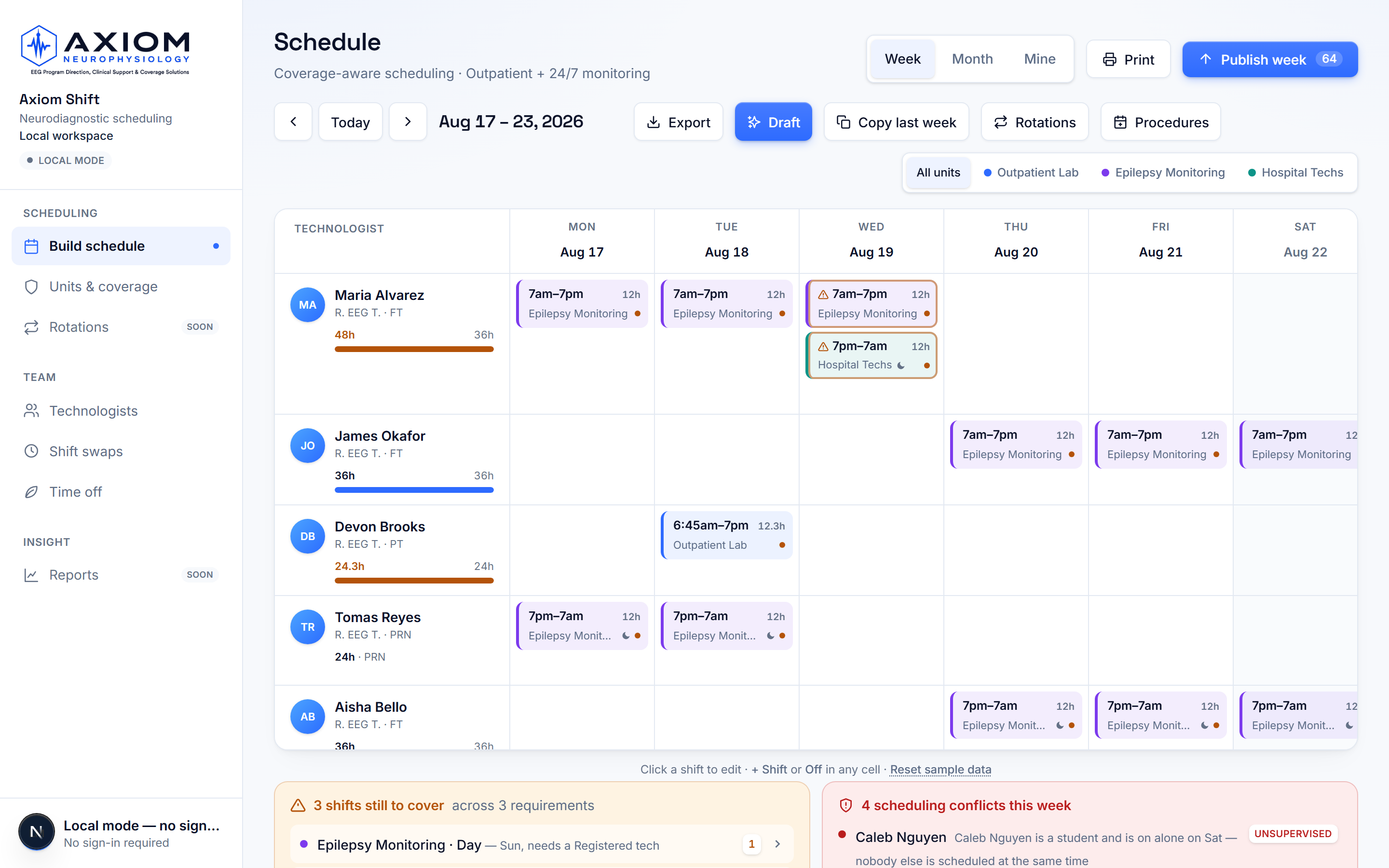
Live product, synthetic demo workspace — no patient information.
Built from the rules a real department runs on
Coverage that knows the rules
Each unit states what it needs staffed — including qualifications like a registered tech on the EMU. Someone who cannot do the work is never counted as covering it.
Draft a month in seconds
One button lays out a week or a month from the requirements and the roster. It proposes, a human decides, and anything it cannot safely fill is reported with the reason.
Procedures route themselves
Book a Wada, Phase II, VER, or ECOG onto a date and only trained techs can be scheduled to it — the draft places them, the checks catch anyone else.
Guardrails on what spreadsheets hide
Double-booking, short rest, long stretches, approved time off, unqualified assignments, a student rostered alone, a traveler outside their contract dates.
Fairness the team can see
The schedule remembers who worked the last four weekends and recent nights, shows it beside every candidate, and weighs it when drafting.
The 5:45am call-out, handled
Someone calls in sick and one button answers: ranked replacements who are qualified, rested, and under their hours — or release the shift for one-tap volunteering. The sick day is recorded, not remembered.
Ask the schedule in plain English
“Who can cover Saturday?” “Who's worked the most weekends?” Answered by the same engines that build the schedule — deterministic, never invented.
Reports management actually asks for
FTE required vs contracted vs scheduled, with the arithmetic shown — plus a what-if preview of losing any tech for any stretch, before the crisis.
Overtime in dollars, before it's spentPro
Every week and every draft shows its overtime cost at each person's rate — the number a director acts on, visible while the schedule is still a proposal instead of on next month's payroll report.
Credentials that can't quietly lapsePro
Expiry-dated credentials with 60/30/7-day warnings — and a red flag the moment someone is scheduled past a lapsed credential. The accreditation finding, caught while it's still a draft.
On-call, tracked at lastPro
One name per day and night slot, fairness-counted so the pager burden is visible before you assign it, with a notification for whoever carries it — and "who is on call tonight?" answered from the record.
Payroll numbers without the re-keyingPro
A per-person, per-pay-period export with the weekly overtime split already done — published shifts only, formatted for hand-off, so the bi-weekly chore takes a click.
Texts for the moments that matterPro
Published schedules, swap decisions, and on-call assignments can reach phones as texts — because hospital email is where messages die. The in-app record stays the source of truth.
Several sites, one login
A regional lead belongs to every site they oversee and switches between them in one click. An overview puts every site's week side by side — coverage short, still a draft, or covered — judged by exactly the rule each site uses. A technologist who floats is on both rosters and gets one calendar feed.
Techs run their own week
Personal schedules, one-tap volunteering for open shifts, swaps, time-off requests, and a private feed that puts shifts in the phone calendar they already use.
Publish deliberately
Drafts stay invisible until you publish. The confirm names who it pushes into overtime and any shift landing on a day someone has approved off — before the team plans around it.
Staffing checked against study volume
Paired with OrderFlow, Shift reads how many studies are booked each day for the next two weeks and checks it against who is scheduled: "15 studies, 2 techs staffed, about 4 per tech, short by 2." The per-tech number is your department's own setting, stated every time it is used. Approved time off travels with the schedule, so OrderFlow never counts someone on leave as available.
Coverage calendar: readers and the pager
A separate calendar for who is covering, not who is working: the day and night pager, the adult reader and the pediatric reader, one name per lane per day. Reading physicians come from the roster (imported from OrderFlow when paired) and are never counted as staffing. When paired, the reader of the day flows into OrderFlow so nobody types it twice.
Security your IT department can check
Two-step verification for any account, and a workspace can require it of everyone. Each site's data is walled off in the database rather than by the screens, roles are enforced on the server, private things are kept private — a person's calendar link is theirs alone, and the reason on a time-off request is seen only by them and the schedulers deciding it, and every schedule change records who made it. A written security review is available for IT, including what we do not hold.
Changes that stay accountable
Move a shift to somebody else from the shift itself — it keeps its identity and the person taken off is told. Clearing a day is one undo away. When someone leaves, an administrator removes their access in a click; their shifts, hours and history stay with the department, and the removal is in History.
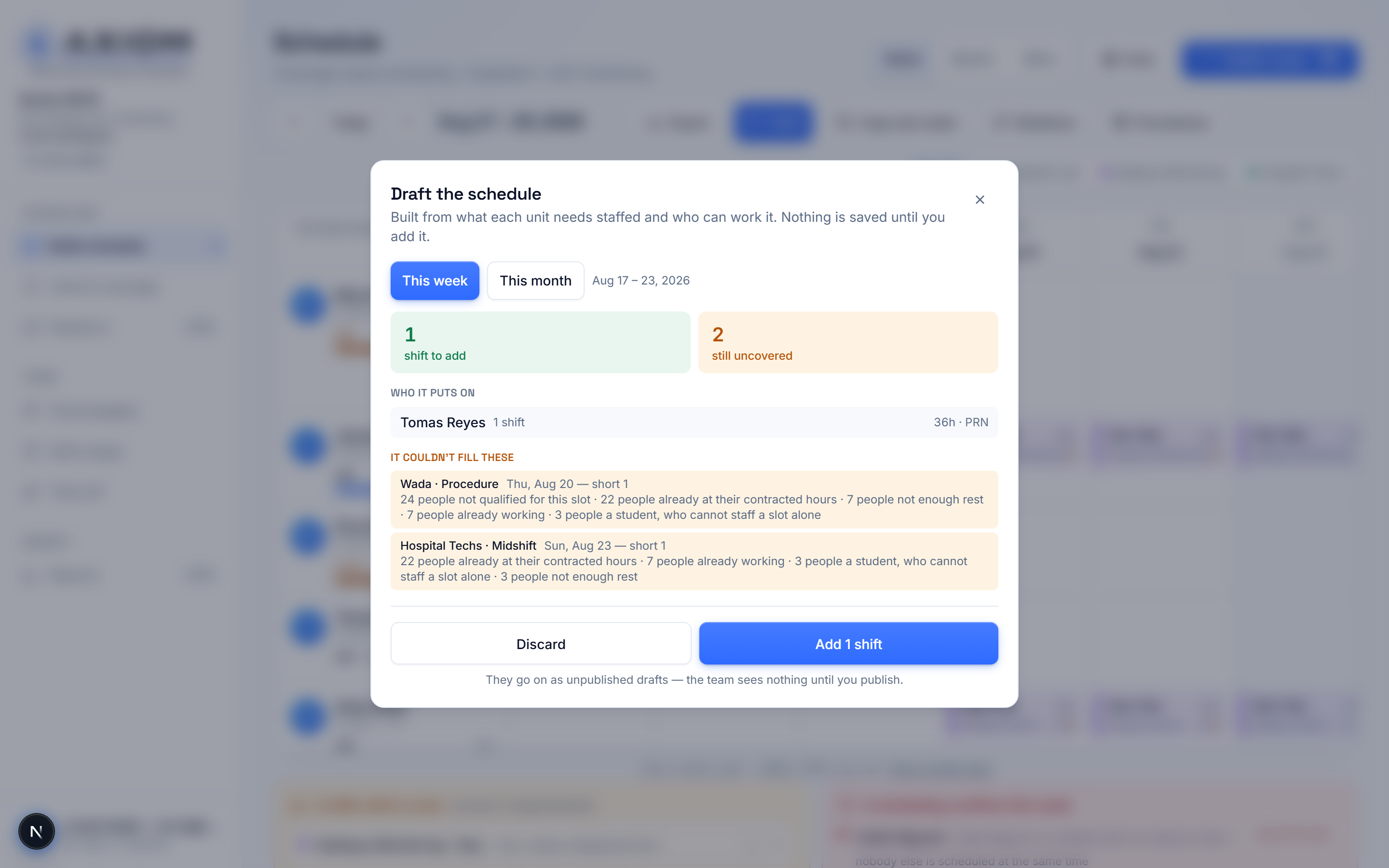
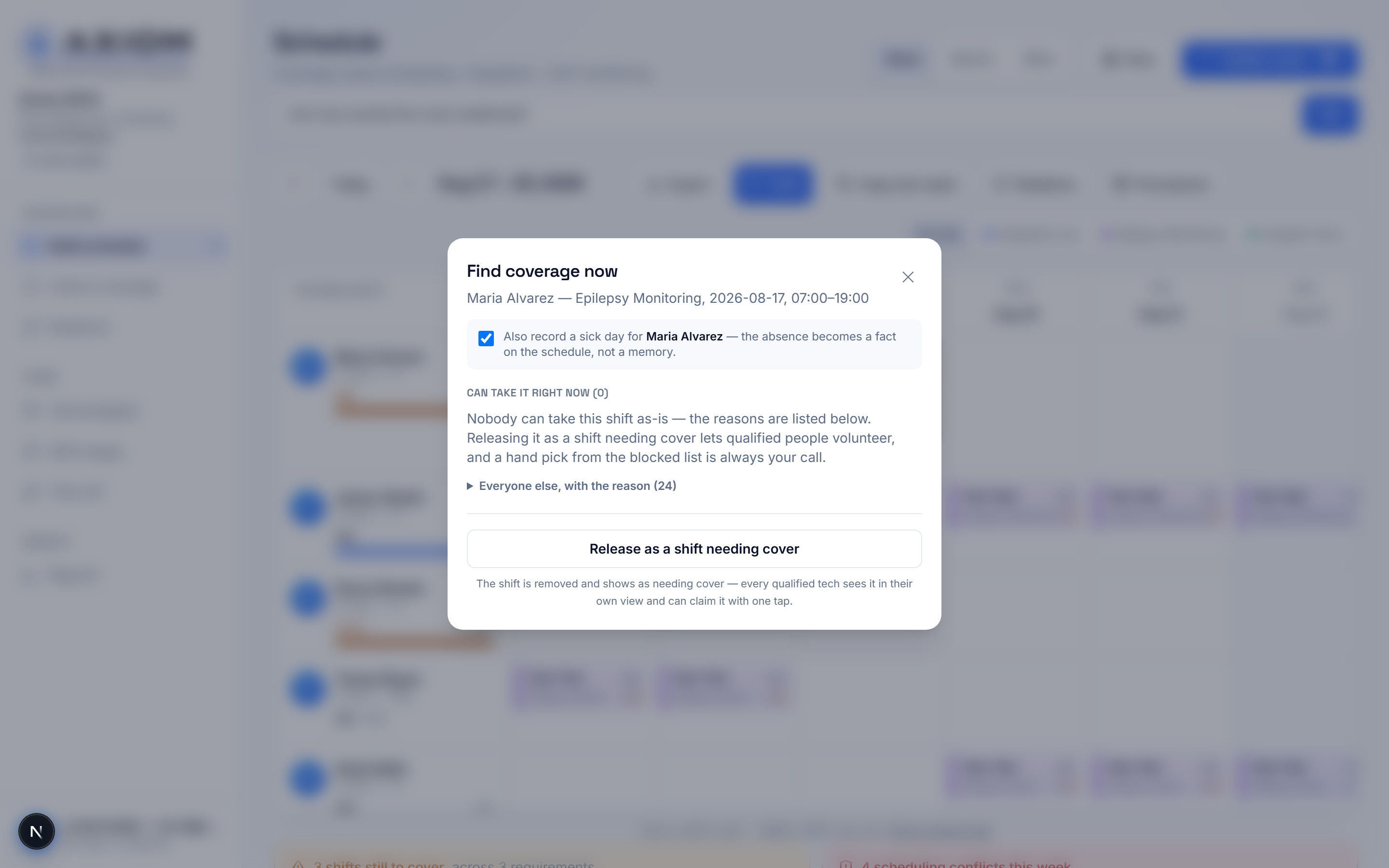
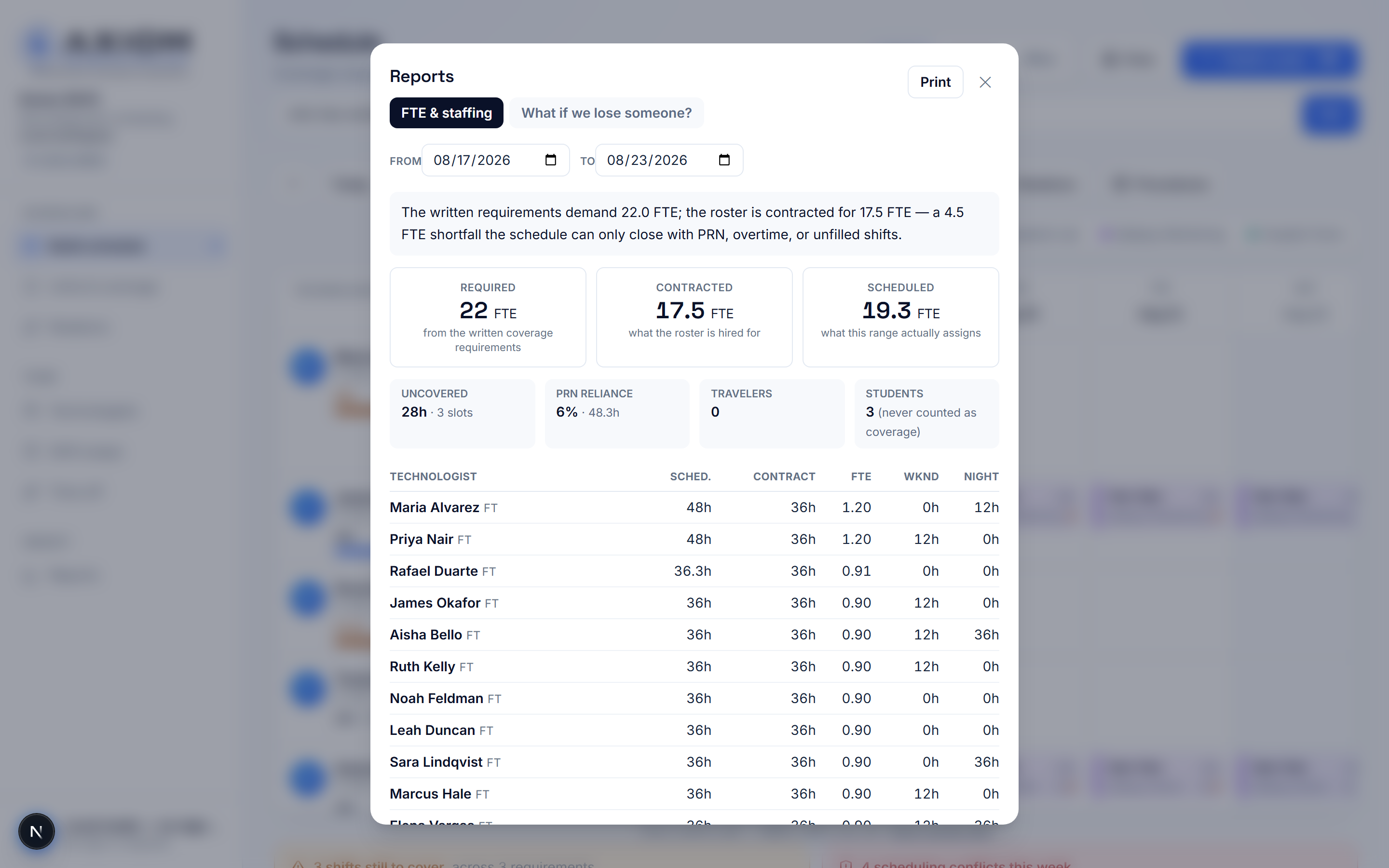
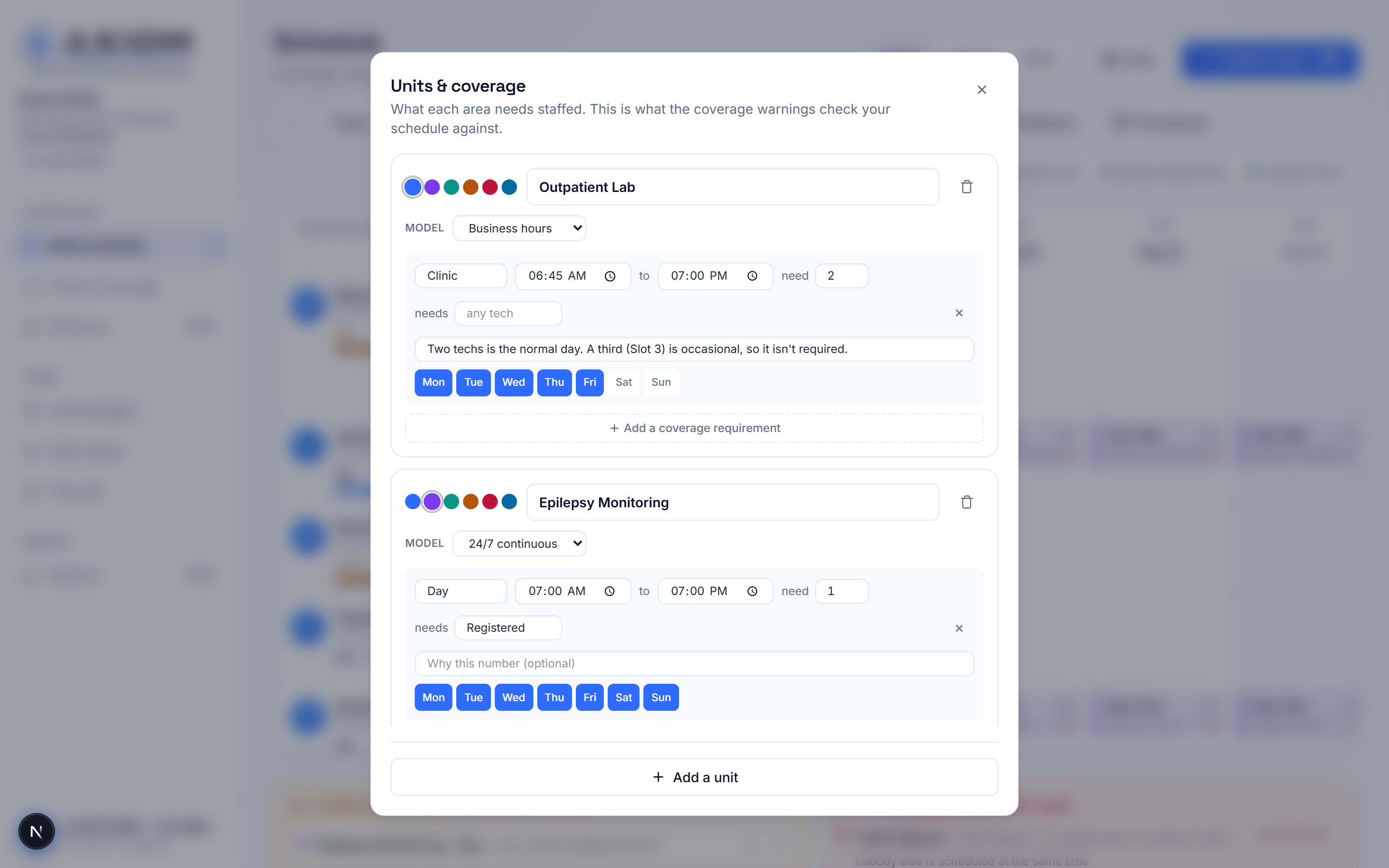
No mockups or concept art — screenshots straight from the live app, running a synthetic demo workspace. No patient information appears in any image.
Priced to be a department decision
Simple list pricing, invoice-based. Pilots are paid and fixed-scope; the fee credits toward year one on conversion.
Standalone
$750/mo
- One department, up to 30 scheduled staff — then $15/person/mo
- Set it up yourself at no charge, or guided setup at $1,500
- Pilot: $1,500 for 60 days, credited toward year one
Best for hospital departments
Pro
$1,000/mo
- Everything in Standalone, same included staff count
- Overtime in dollars — every week and every draft priced before it's published, at each person's rate
- On-call tracking with fairness counting, notifications, and 'who is on call tonight?' answers
- Credential & competency expiry tracking — 60/30/7-day warnings and scheduled-while-expired flags
- Payroll-ready export — weekly overtime split, per pay period, formatted for hand-off
- Text-message notifications for published schedules, swaps, and on-call assignments
With Axiom OrderFlow
$375/mo
- Beside an OrderFlow Clinic or Department package — half the standalone rate, and the discount exists only on the pair
- OrderFlow Enterprise includes Shift for contracted sites
- The pair works as one suite: a published schedule lands in OrderFlow for supervisor review, and OrderFlow reports each day's study counts back to the builder
- Start with Shift and add OrderFlow later? You move to this rate the day OrderFlow lands.
See your own department’s week drafted in front of you.
Common questions
What is Axiom Shift?
Scheduling software for neurodiagnostic and EEG technologist teams. It handles qualification-restricted units, 24/7 monitoring alongside a weekday lab, specialized procedures, travelers on contracts and students who are present without counting as coverage — and it drafts the month from the department's own coverage requirements.
Who is it for?
Neurodiagnostic and EEG departments in hospitals, epilepsy monitoring units, long-term monitoring services and outpatient EEG labs — anywhere technologists are not interchangeable and a filled slot is not the same thing as covered.
Who built it?
Drewe Cosby, R. EEG T., a registered EEG technologist and neurodiagnostic operations leader, through Axiom Neurophysiology. It is a sibling product to Axiom OrderFlow, which handles EEG order intake and department operations.
Does any patient information go into it?
No. Axiom Shift schedules people, not patients. No patient names, medical record numbers, dates of birth or study data enter the system at any point.
Does it need Axiom OrderFlow?
No. Axiom Shift is sold and runs standalone as a separate purchase. A bundle rate applies to departments that also run Axiom OrderFlow — and the two now pair as the Axiom Suite: publish a schedule here and it arrives in OrderFlow as a draft availability batch a supervisor reviews, while Shift reads back per-day study counts so the schedule follows the workload.
Read more
- Neurodiagnostic scheduling softwareCoverage requirements per unit, month drafting, and staffing evidence.
- EEG tech scheduling softwareQualifications, rotations, swaps, and the calendar feed techs actually use.
- EMU and long-term EEG monitoring staffingContinuous coverage, overnight fairness, and honest gap reporting.